
Article
Integrating predictive analytics into Power BI with Microsoft Fabric
March 31, 2025 · Authored by Chris Wagner
Integrating predictive analytics into Power BI and other business intelligence tools can provide significant insights and competitive advantages in today’s data-driven ecosystem. Microsoft Fabric offers a robust solution for this integration, enabling organizations to harness the power of artificial intelligence (AI) and machine learning (ML) to make data-driven decisions. Explore how to integrate predictive analytics into Power BI using Microsoft Fabric, focusing on the data flow from raw data ingestion to enriched data analysis and visualization.
Overview of the solution
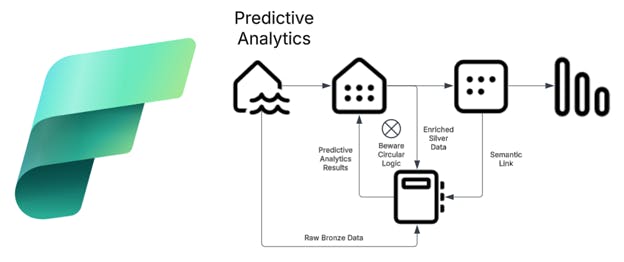
Microsoft Fabric facilitates the seamless integration of predictive analytics into Power BI through a structured data pipeline. The process involves three primary sources of data: the bronze lakehouse (raw data), the silver layer (enriched data) and the semantic layer (analytical data). These data sources are consumed in Python notebooks, where AI models generate predictive analytics. The enriched data is then fed into the data warehouse in the silver layer and subsequently passed to the semantic layer for consumption in Power BI reports.
Data sources
- Bronze lakehouse (raw data): This layer contains raw, unprocessed data ingested from various sources, serving as the foundation for all subsequent data transformations and analyses
- Silver layer (enriched data): In this layer, the raw data is cleaned, transformed and enriched. This includes integrating predictive analytics generated by AI models in Python notebooks. The enriched data is stored in the data warehouse, making it ready for further analysis.
- Semantic layer (analytical data): The final layer involves creating a semantic model that links the enriched data to Power BI reports. This layer enables users to create meaningful visualizations and derive actionable insights from the data.
