
Article
Save time and derive better insight from your data with financial dashboards
Jan. 26, 2021
With the ever-changing business environment, being able to connect the right business data with strategic business decisions is increasingly critical.
Data visualizations and dashboards are changing the way we access, view, and analyze organizational data. This is especially true in accounting and finance roles. Tapping into the potential of your business' data can deliver major value, but without the right tools, you could miss out on discovering important insights.
Modern visualization software tools such as Power BI and Tableau could transform your manual spreadsheet-based processes into a highly automated and streamlined set of dashboards and reports.
The following is a breakdown of common data issues in the accounting environment and how dashboards can help you solve them, save time and money, and derive deeper insights from your data.
The challenges you face
In the accounting environment, extracting data, assembling spreadsheets, and creating reports are all common occurrences.
Many accountants rely on spreadsheets because most individuals in the space are familiar with them. They can be a great way to run short, one-time, or experimental processes; however, they also come with significant drawbacks.
Reporting requirements often snowball
Problems can arise should you become a victim of your own successes with spreadsheets. If you create value by making a spreadsheet, it’s likely you’ll be compelled to repeat that process to generate more value.
Frequently the process or report grows to include other factors and becomes more complex over time. While this isn’t a problem per se, the issue is that often as reporting requirements increase, they can begin to take up more time than originally intended. This often happens gradually over a period of time, so the impact isn’t felt until you find yourself spending 40-plus hours a month generating reports.
Lengthy reports can introduce errors and risk
As the amount of time spent on manually manipulating data increases, so does the potential for error.
Many accountants rely on spreadsheets because most individuals in the space are familiar with them. They can be a great way to run short, one-time, or experimental processes; however, they also come with significant drawbacks.
Add in modern distractions, competitive pressures, increasing work tempo, remote-work — and you have a recipe for important operational cues to be missed, or worse, a loss of trust in an individual or a process. Over time, this can lead to significant issues.
Benefits of dashboards
Regardless, spreadsheets are here to stay, and there will always be a need for the one-off processing they enable. However, many of their functions can be replaced and improved by dashboards.
Visualize trends and insights
Dashboards allow you to visualize trends over time and track any spikes or dips, which can be more meaningful than simply looking at raw numbers.
Additionally, depending on the source of the dataset, you can easily drill down to the most specific level of detail, whether it be the account balance, journal entry with header information or line item detail, or even customer-level insights.
When utilizing data visualization software and dashboards, all your financial data is conveniently connected and stored in one place for easier accessibility. For example, you may currently produce multiple sets of financial statements for your various companies and subsidiaries separately. With dashboards, you can access and visualize this data at once and instantly change selections or assumptions. This can improve efficiency for your team.
The following are examples of how dashboards can provide summary data across many functions and drill-down capabilities.
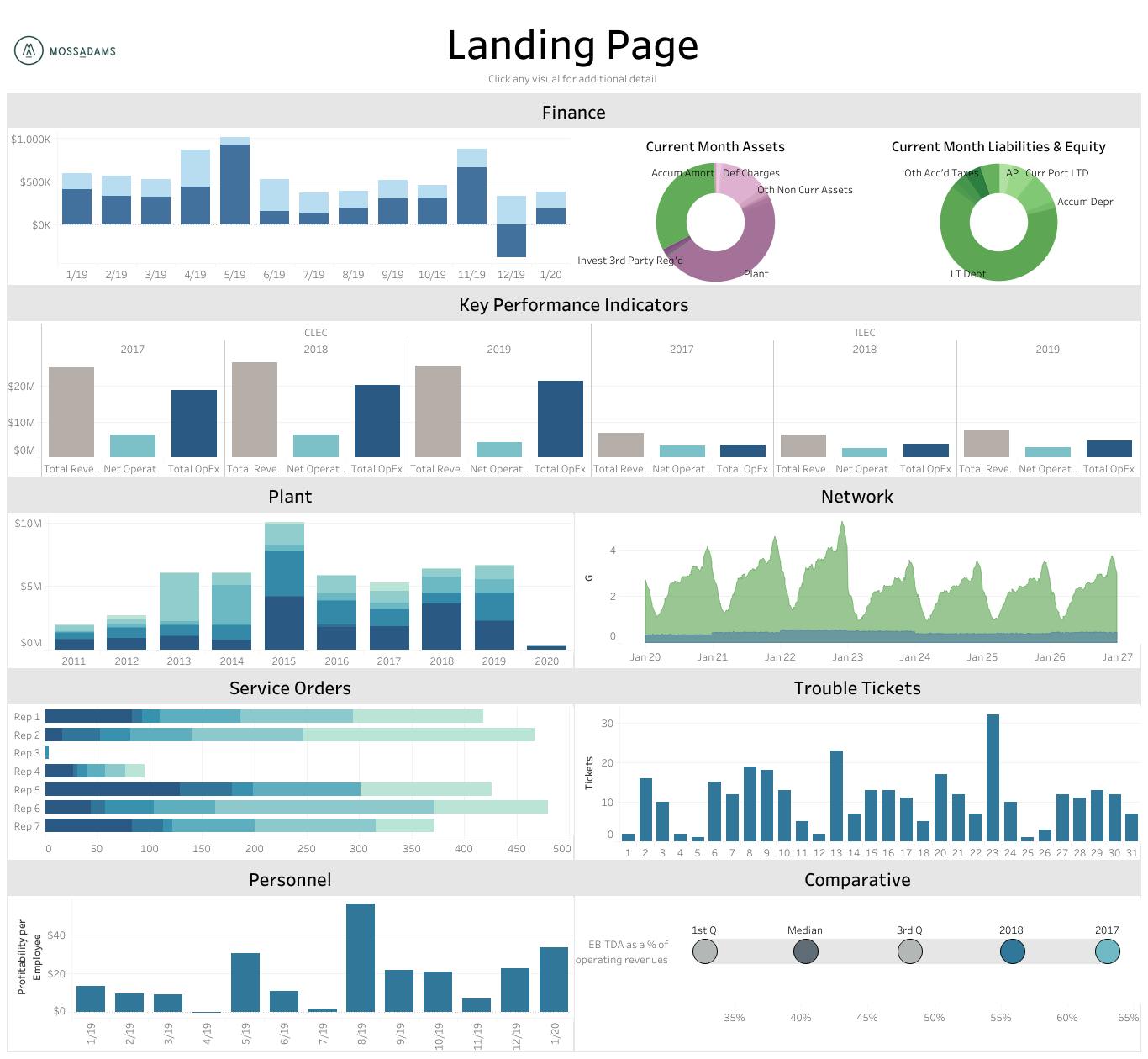
A landing page can reveal cross-functional insights as well as provide a clear path to accessing these datasets.
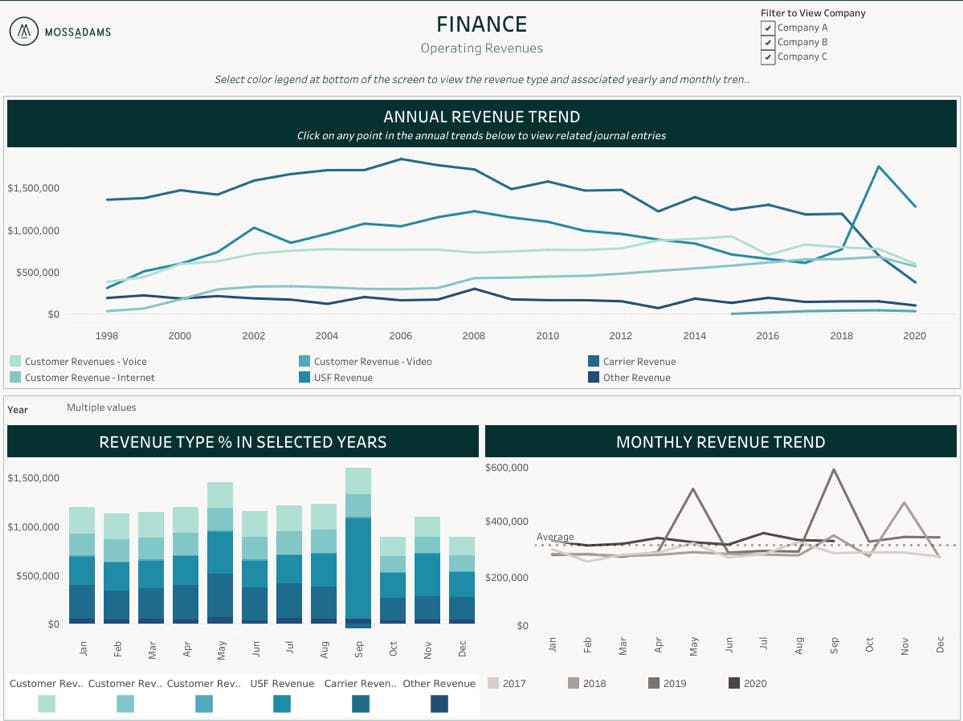
Here’s an example of a financial dashboard tracking select revenue metrics that also permits multiple divisions or companies to be viewed together or individually.
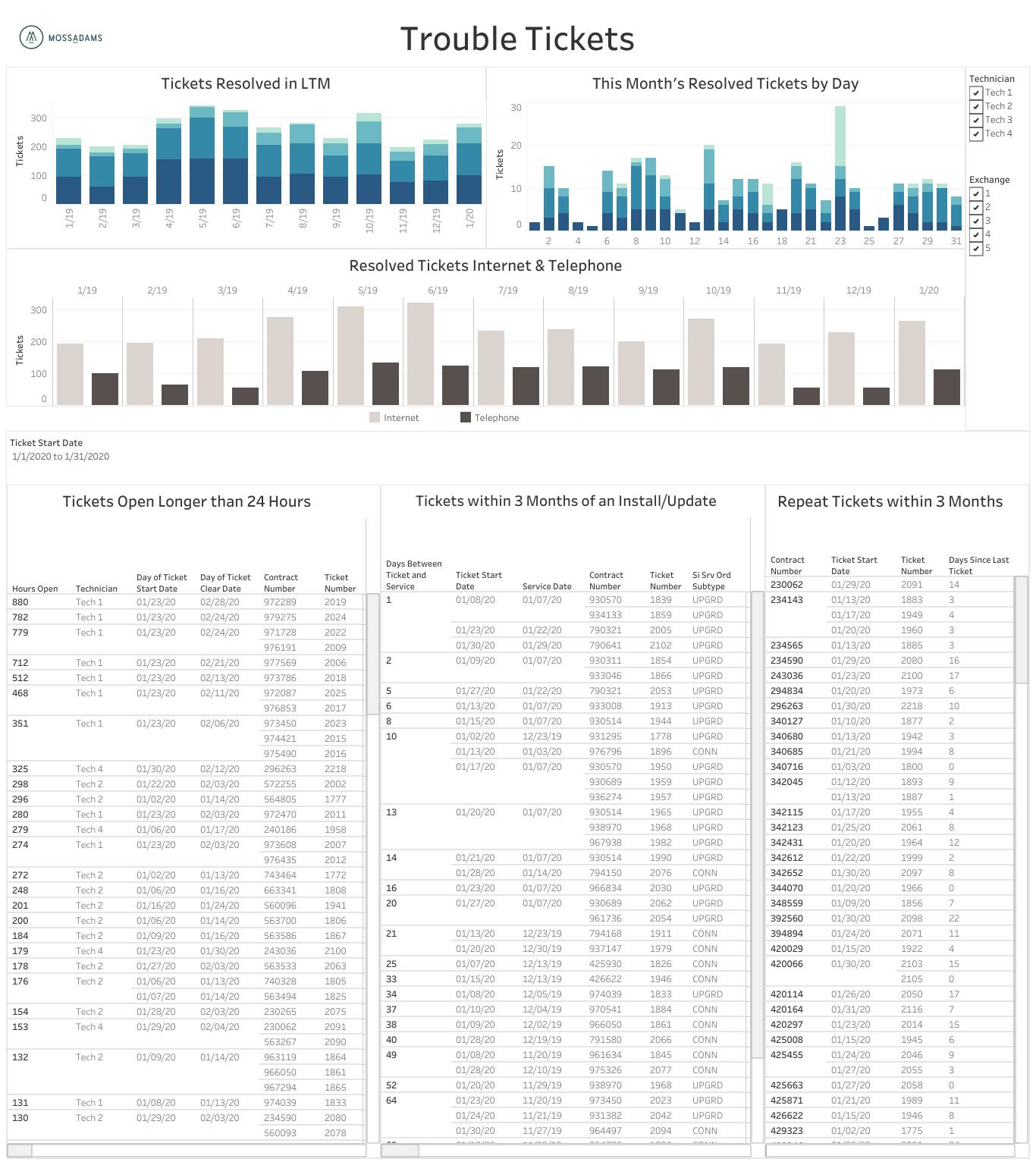
Dashboards let you track and view trends to meaningfully report on data, while easily accessing its source.
These ad-hoc type of analytics are also useful because it can give you access to multiple sources of proven data instantly. As a result, you get an answer to your quick question with context.
Additional features in both Tableau and Power BI allow you to schedule data refreshes for times when your company systems are most available, such as in the middle of the night. They also allow you to receive updated reports by email, so for instance, you could have a status report on your top five metrics emailed to you 10 minutes before the start of every workday.
How to transition to a dashboard
Some companies have teams dedicated to setting up and running data systems and analytics, but many don’t. If the latter describes your organization, here are some steps to help you get started:
1. Evaluate your systems and needs.
Taking time to get a thorough data assessment can not only help you make the most of your data systems and set priorities for your reporting needs, but it can also help you derive the most value from work you do or have done.
2. Determine how much time you and your staff spend on data transformation and reporting.
Often these processes are essential to your business, but they’re also the most time consuming. Automating these processes might be the biggest savings you can make by using data over the near-term.
3. Replace any reporting with an automated dashboard or process.
When discerning whether or not to automate a process there is a common sentiment that can be useful in guiding your decision: If you have to do it once or twice, do it manually; if you have to do it three or more times, find a way to automate it.
An automated process can benefit you by saving time and reducing the likelihood of human error.
4. Start with your finance team, then branch out into other parts of your business.
It seems that everyone wants a better way to understand where their resources are allocated. Getting started with financial dashboards is a great way to save time and gain a deeper understanding of the data you have, make the most of your data, and empower leaders to make data-driven decisions.
It’s common for a company to expand beyond finance data once its leaders have experienced the added benefits of automation and visual analytics. In many cases, dashboards can be used to conduct status updates, giving leaders instant access to the full capability of their data.