
Article
3 ways user experience (UX) can make or break ERP adoption
Feb. 26, 2023
User Experience (UX), is often misunderstood to mean the same thing as User Interface (UI). While both UX and UI are critical features that can impact the chances of your ERP system realizing its full potential, the differences between the two must be understood when evaluating an ERP solution for your organization.
UI is the collection of tangible elements that allow a user to interact with an application or website - think of the menus, screens, and graphics that you interface with on your favorite mobile apps or the customized inbox layout on your work e-mail. UI is related to the application design and how it looks.
Unlike UI, UX is not defined by a specific set of visual objects, but rather what the user takes away from interacting with those visual objects that make up the experience. In this sense, UX is all about the subjective, internal feelings of the user. Below are key questions to consider when evaluating your ERP’s UX.
- How does the experience leave users feeling?
- Are users empowered or inhibited?
- Are users engaged or distracted?
- Are users encouraged or frustrated?
In a world where we spend most of our workday interacting with technology, shouldn’t we at least feel empowered, engaged, and encouraged while we are doing it?
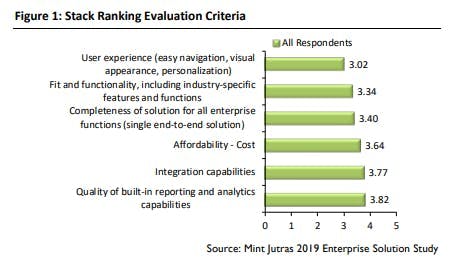
In a recent study, participants ranked the top 6 traditional ERP evaluation criteria in order of (1) most important to (6) least important. The results show that user experience ranked as the most important criteria, and pulled ahead of ‘fit and functionality’ for the first time.
Here are three ways an ERP user experience can be improved to boost company performance and the value gained from your IT investment.
- The user experience should be simple
ERP systems are complex by nature. Hundreds, if not thousands, of modules and screens link together in harmony to provide an integrated view of business operations. A simple user experience can bypass daunting complexity by providing tools that enable users to get where they need to go at a moment’s notice. This experience not only drives efficiency but also keeps users satisfied by instilling a greater sense of confidence in the tools that are critical to their roles.